Using Veeva Training & VeevaID
Accessing Veeva Training
Site and sponsor users access Veeva Training using different methods:
- Site users must use VeevaID to access Veeva Training. Users without VeevaID will be prompted to register for one after the 24R2 release.
- All other users (sponsor users) will access Veeva Training using their Veeva EDC username (sponsor ID).
For the purposes of VeevaID, all users are split into two categories, site users and sponsor users. If you are not a site user, you can consider yourself a sponsor user.
Email-Based Tracking: CDMS Training uses the user’s email address as the unique identifier for tracking training. Users with multiple EDC accounts linked to a single email address have one training profile and only need to complete an assigned curriculum once.
You can use the My Training tab to access required training. The main table displays the training username for each training requirement.
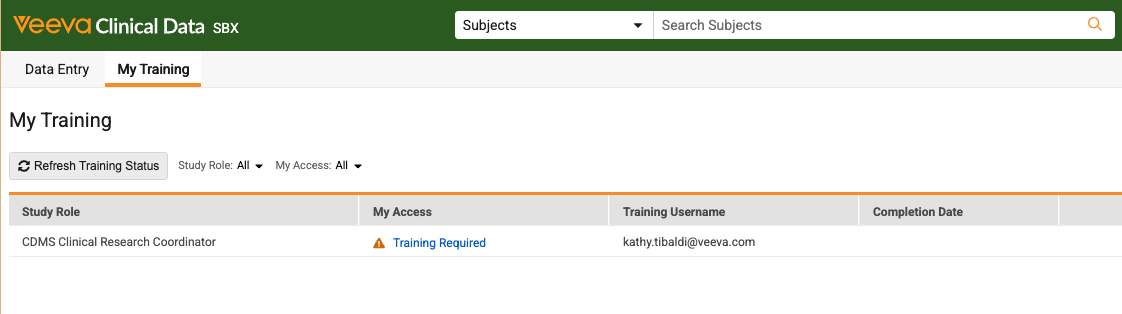
See below for details on accessing training as a site or sponsor user.
For answers to frequently asked questions, see Veeva Training and VeevaID FAQ.
Veeva Training as a Site User
As a site user, you must register for and log in with VeevaID to access CDMS Vault Training.
How to Register for VeevaID
As of the 26R2 release, all users who are already registered for VeevaID have received a notification instructing them on how to use their existing VeevaID to access both CDMS Vault Training and EDC.
To register for VeevaID:
- Click Start Registration
- Enter your First Name, Last Name, Language, Locale, and Timezone.
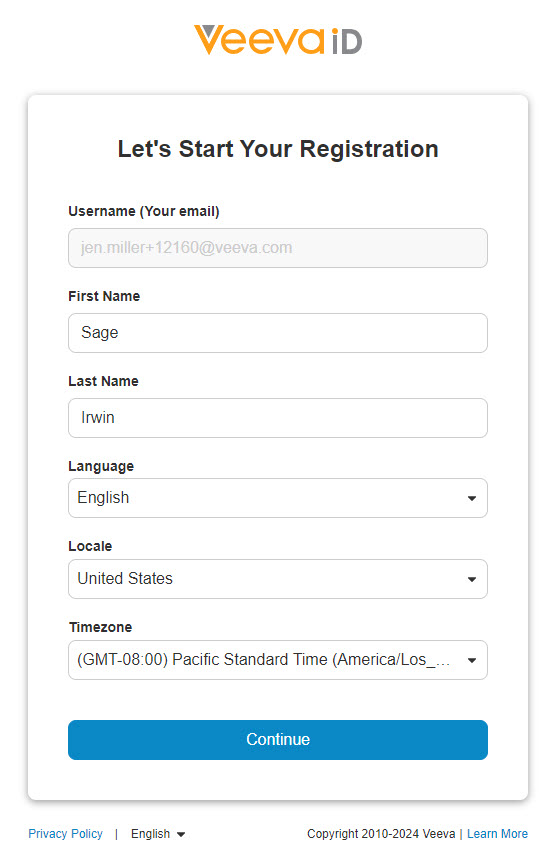 .
. - Click Continue.
- Set your VeevaID Password. Your password must be a minimum of 8 characters long, contain one or more lowercase letters, one or more uppercase letters, and one or more numbers.
- Click Join Now.
You will be required to enter a VeevaID verification code to complete multi-factor authentication the first time you log in using your VeevaID and every time you log in using a new device.
If you haven’t registered within 72 hours, a reminder email containing the registration link will be sent again. Reminder emails will be sent every 72 hours until two weeks after the initial email was sent, at which point the registration link will expire and no more links will be sent. After the registration link expires, you will need to contact the Vault CDMS Support team (CDMS_Support@veeva.com) to re-initiate registration.
As of this release, site users use VeevaID to access their Veeva EDC studies.
Accessing Training
After you register for VeevaID, there are two ways to access your training:
- Log in to Veeva EDC using your VeevaID, navigate to the My Training tab, and click the linked text under the My Access column (Training Required, Valid, or Training Not Required).
- Log in to VeevaID , navigate to the Systems tab, and click CDMS Vault Training.

Veeva Training as a Sponsor User
Sponsor users access Veeva Training using their sponsor ID, either through the Vault Selector or the My Training tab.
Accessing Veeva Training from the Vault Selector
To access Veeva Training using the vault selector:
- Log in to Veeva EDC using your sponsor ID.
- Click the vault selector in the upper-right header area to view your vaults.
- Click Veeva Training to open your training.
Accessing Veeva Training from the My Training Tab
To access Veeva Training from the My Training tab:
- From within your Veeva EDC Vault, navigate to the My Training tab.
- Click Training Required to open your training.
User Training Report (Site & Sponsor Users)
The User Training Report provides details regarding training access, including columns for your Learning System Username and VeevaID Registration Status:
- Learning System Username: This column indicates the username associated with your training access.
- If you are a site user, this column shows your VeevaID.
- If you are a sponsor user, it displays your domain username.
- If your training username isn’t available yet, sponsor users see a blank entry while site users see their CDMS email address.
- If you do not have a user type assigned, this column remains blank.
- VeevaID Registration Status: This column shows your current registration status for VeevaID, such as Registered, Invitation Sent, or Invite Attempts Exhausted.
This information refreshes approximately every 12 hours.