Post Go-Live Change Impact and Restrictions
After you publish the initial version of your Casebook Definition, Vault prevents you from making certain changes in any later versions you may create. If you were to make these changes, it could cause errors during the casebook amendment process.
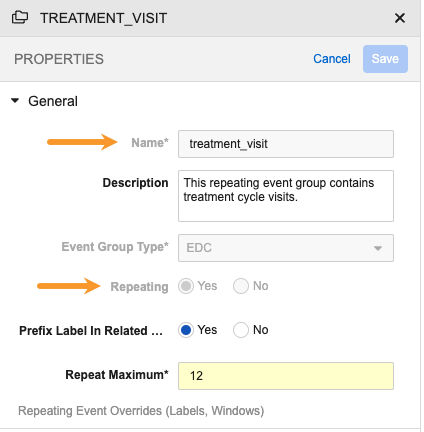
For disallowed changes, Vault disables the appropriate control in the Studio Properties panel. In the image below, the Name, Event Group Type, and Repeating property fields are all disabled, even though the Properties panel is in Edit mode.
Development Environment Data Conflict for Permitted Changes: In some cases, data existing in your development (DEV) or test (TST) environment conflicts with changes you may attempt to make in that environment, even though these changes are not restricted. When this happens, the system displays an error dialog, with a message that describes the issue. To resolve this error, delete existing casebooks in the environment and try again.
The table below describes various post go-live configuration update scenarios.
| Category | Update Scenario | Post Go-Live Changes Allowed | Requires New Version | Destructive Change | Breaks Signature | Unfreezes Data | Unsubmits Forms | Breaks SDV/DMR | Recommendations & Comments |
|---|---|---|---|---|---|---|---|---|---|
| Codelists | Code or Name updates |
No | N/A | N/A | N/A | N/A | N/A | N/A | Create a new Codelist Item with the desired name and hide the original |
| Codelists | Label updates |
Yes | Yes | No | Yes | Yes | Yes | Yes | This only breaks signature, form status, etc., if the Codelist Label option being changed has been selected. |
| Codelists | Remove or delete existing Codelist Items |
No | N/A | N/A | N/A | N/A | N/A | N/A | Use the hide function to hide the Codelist Item |
| Codelists | Hide existing Codelist Items |
Yes | Yes | No | No | No | No | No | If the Codelist Item you’re hiding has been selected for the Item in Data Entry, EDC won’t remove that data. The Codelist Item will only become unavailable for future selection. Upon changing the data from the previously hidden choice to a new option, the signature, SDV, etc., will be broken. |
| Codelists | Make existing Codelist Items visible (unhide) |
Yes | Yes | No | No | No | No | No | |
| Codelists | Reorder Codelist Items |
Yes | Yes | No | No | No | No | No | |
| Codelists | Add new Codelist Items to the Codelist |
Yes | Yes | No | No | No | No | No | This only impacts existing data if an existing Form is resubmitted with a new Codelist Item selected. |
| Codelists | Change the Control Type (picklist, radio buttons, etc.) |
Yes | Yes | No | No | No | No | No | |
| Units | Update conversions |
No | N/A | N/A | N/A | N/A | N/A | N/A | We recommend that you hide the original Unit Definition and add a new one with the updated conversion formula. |
| Units | Label updates |
Yes | Yes | No | Yes | Yes | Yes | Yes | This only breaks signature, form status, etc., if the Unit Label option being changed has been selected. |
| Units | Remove or delete existing Unit Items |
No | N/A | N/A | N/A | N/A | N/A | N/A | Use the hide function to hide the Unit Item |
| Units | Change the default Unit Items |
No | N/A | N/A | N/A | N/A | N/A | N/A | Create a new Unit Item with the desired default |
| Units | Hide existing Unit Items |
Yes | Yes | No | No | No | No | No | If the Unit Item you’re hiding has been selected for the Item in Data Entry, EDC won’t remove that data. The Unit Item will only become unavailable for future selection. Upon changing the data from the previously hidden choice to a new option, the signature, SDV, etc., will be broken. |
| Units | Make existing Unit Items visible (unhide) |
Yes | Yes | No | No | No | No | No | |
| Units | Reorder Unit Items |
Yes | Yes | No | No | No | No | No | |
| Units | Add new Unit Items to the Unit |
Yes | Yes | No | No | No | No | No | This only impacts existing data if an existing Form is resubmitted with a new Unit Item selected. |
| Units | Change the Abbreviation for a Unit Item |
Yes | Yes | No | No | No | No | No | |
| Event Groups | Make a non-repeating Event Group into a repeating Event Group (non-repeating to repeating) |
Yes | Yes | No | No | No | No | No | |
| Event Groups | Reorder Event Groups |
No | N/A | N/A | N/A | N/A | N/A | N/A | Moving events across event groups is a destructive change that is not supported as this breaks the Event Group - Event relationship. Moving an Event is the equivalent of removing it from one Event Group and adding it to another one |
| Event Groups | Make a repeating Event Group into a non-repeating Event Group (repeating to non-repeating) |
No | N/A | N/A | N/A | N/A | N/A | N/A | Create a new, non-repeating Event Group |
| Event Groups | Make a scheduled Event Group into an unscheduled Event Group and vice versa |
No | N/A | N/A | N/A | N/A | N/A | N/A | Create a new, scheduled or unscheduled Event Group |
| Event Groups | Update the Name |
No | N/A | N/A | N/A | N/A | N/A | N/A | Create a new Event Group with the desired name |
| Event Groups | Update Repeating Event Overrides |
Yes | Yes | No | N/A | N/A | N/A | N/A | |
| Event Groups | Update the Label, Short Label, or External ID |
Yes | Yes | No | N/A | N/A | N/A | N/A | |
| Event Groups | Change a non-dynamic Event Group to Dynamic |
Yes | Yes | No | No | No | Yes | No | You must create or revise an appropriate Add Event Group rule to add dynamic Event Groups to your study design |
| Events | Update the Name |
No | N/A | N/A | N/A | N/A | N/A | N/A | Create a new Event with the desired name |
| Events | Add or update Event Windows |
Yes | Yes | No | No | No | N/A | Yes | This only applies to queries (both existing and new) if the query results in a data change from the site. Note that when removing Event Windows, you may need to delete DEV and TST environment casebooks that were created using the previous Event Window, or an error will occur. |
| Events | Add or update Visit Method |
Yes | Yes | No | No | No | No | No | Can be added to existing events using Edit Event Details after the retrospective amendment job is complete. |
| Events | Reorder Events |
Yes | Yes | No | No | No | N/A | Yes | |
| Events | Change an non-dynamic Event to Dynamic |
Yes | Yes | No | No | No | N/A | No | |
| Events | Change the Event Type to Log |
No | N/A | N/A | N/A | N/A | N/A | N/A | Create a new Event with the desired Event Type |
| Forms | Update the Name |
No | N/A | N/A | N/A | N/A | N/A | N/A | Create a new Form with the desired name |
| Forms | Update the Label, Short Label, or External ID |
Yes | Yes | No | No | No | No | No | |
| Forms | Change a non-dynamic Form to Dynamic |
Yes | Yes | No | No | No | No | No | You must create or revise an appropriate Add Form rule to add dynamic Forms to your study design. |
| Forms | Add new Form Link relationships |
Yes | Yes | No | No | No | No | No | |
| Forms | Remove existing Form Link relationships |
Yes | Yes | No | No | No | No | No | |
| Forms | Change existing Form Link Text |
Yes | Yes | No | Yes | Yes | Yes | Yes | |
| Forms | Change the Form Link Item |
Yes | Yes | Yes | No | No | No | No | |
| Forms | Add new Item Groups to the Form |
Yes | Yes | No | Yes | No | Yes | Yes | |
| Forms | Remove existing Item Groups to the Form |
Yes | Yes | Yes | No | No | No | No | While this action doesn’t unfreeze the Form, it does unfreeze the Subject and the Event. |
| Forms | Add new Items to the Form |
Yes | Yes | No | Yes | No | Yes | Yes | |
| Forms | Remove existing Items from the Form |
Yes | Yes | Yes | No | No | No | No | While this action doesn’t unfreeze the Form, it does unfreeze the Subject and the Event. |
| Forms | Make a non-repeating Form into a repeating Form |
Yes | Yes | No | No | No | No | No | |
| Forms | Make a repeating Form into a non-repeating Form |
No | N/A | N/A | N/A | N/A | N/A | N/A | |
| Forms | Increase or decrease Repeat Maximums |
Yes | Yes | No | No | No | No | No | When decreasing the repeat maximum, all existing Form records that exceed the new maximum are retained. |
| Forms | Increase or decrease Repeat Minimums |
Yes | Yes | No | Yes | No | No | No | When decreasing the repeat minimum, all existing Form records that exceed the new minimum are retained. New instances of repeating non-dynamic Forms are created automatically when the Repeat Minimum is increased. |
| Forms | Move the Form to a different Event |
Yes | Yes | Yes | Yes | Yes | Yes | Yes | |
| Forms | Change the order of Forms in an Event |
Yes | Yes | No | No | No | No | No | |
| Forms | Mark an existing Form as Restricted |
No | N/A | N/A | N/A | N/A | N/A | N/A | This isn’t allowed. Instead, you must create a new Form. |
| Forms | Make a Restricted form Unrestricted |
No | N/A | N/A | N/A | N/A | N/A | N/A | |
| Item Groups | Update the Name |
No | N/A | N/A | N/A | N/A | N/A | N/A | Create a new Item Group with the desired name |
| Item Groups | Update the Label |
Yes | Yes | No | No | No | No | No | |
| Item Groups | Increase the Repeat Maximum |
Yes | Yes | No | No | No | No | No | |
| Item Groups | Decrease the Repeat Maximum |
Yes | Yes | No | No | No | No | No | You can decrease the Repeat Maximum for an Item Group, but the change will only apply to new instances of the Item Group. To apply this update to existing forms, you must reset the Form manually. |
| Item Groups | Change Default Data |
Yes | Yes | No | No | No | No | No | This can be done as net new. If you’re changing an existing default data rollout, the Form will need to be reset. |
| Item Groups | Change the order of Item Groups in a Form |
Yes | Yes | No | No | No | No | No | |
| Items | Update the Name |
No | N/A | N/A | N/A | N/A | N/A | N/A | Create a new Item with the desired name |
| Items | Update the Label, Short Label or External ID |
Yes | Yes | No | No | Yes | No | No | This can possibly change the meaning of the data. |
| Items | Change the item’s Data Type |
No | N/A | N/A | N/A | N/A | N/A | N/A | Create a new Item with the desired data type |
| Items | Change the Item’s Codelist or Unit |
No | N/A | N/A | N/A | N/A | N/A | N/A | Create a new Item with the desired Codelist or Unit |
| Items | Move an Item within the same Item Group |
Yes | Yes | No | No | No | No | No | |
| Items | Move an Item to a different Item Group |
Yes | Yes | Yes | Yes | No | Yes | No | |
| Items | Increase the Length/Precision |
Yes | Yes | No | No | No | No | No | |
| Items | Decrease the Length/Precision |
No | N/A | N/A | N/A | N/A | N/A | N/A | Create a new Item with the desired Length/Precision |
| Items | Change the Destination for a Derived Item |
Yes | No | No | No | No | No | N/A | |
| Items | Change the Source for a Derived Item |
Yes | No | No | No | No | No | No | |
| Items | Changes to the Allow Unknown property |
Yes | Yes | No | No | No | No | No | Only changes from no selection or a less specific Date or Datetime to a more specific Date or Datetime are permitted. Learn more about changes allowed between versions for retrospective amendment. |
| Items | Updating an Item Dependency (Progressive Display) |
Yes | Yes | No | No | No | No | No | An item dependency doesn’t re-evaluate unless you change the data in the Controlling Item. At that point, Vault would prompt the user about data being removed. |
| Labs | Create a new Lab Panel |
Yes | Yes | No | Yes | No | Yes | No | |
| Labs | Add a new Analyte |
Yes | Yes | No | Yes | Yes | Yes | Yes | |
| Labs | Remove an Analyte |
Yes | Yes | Yes | No | No | No | No | |
| Labs | Update the Name of the Lab Panel |
No | N/A | N/A | N/A | N/A | N/A | N/A | |
| Labs | Update the Label or External ID for the Lab Panel |
Yes | Yes | No | No | No | No | No | |
| Labs | Update the Conversion Factor |
Yes | No | No | No | No | No | No | An update to Conversion Factors that causes submitted data to go from in range to out of range will break the signature. This can only be done in Studies using Global Labs. |
| Rules | Email Groups (being assigned to rule actions) |
Yes | No | No | No | No | No | No | |
| Rules | System Queries (Incl. Ranges) |
Yes | No | No | No | No | No | No | This only applies to queries (both existing and new) if the query results in a data change from the site. |
| Rules | Rules (User Defined and comparison) |
Yes | No | No | No | No | No | No | This only applies to queries (both existing and new) if the query results in a data change from the site. |
| Schedule | Review Plan requirement changes |
Yes | No | No | No | No | No | Yes | Review status of reviewed objects will be retained if going from Optional -> Optional / Required or Required -> Optional/Required. Only broken if No Review -> Optional/Required |
| Schedule | Signatures Update |
Yes | No | No | Yes | No | No | No | |
| Schedule | Addition of New Forms |
Yes | Yes | No | Yes | No | No | No | Signature for the Event and Subject is broken |
| Schedule | Removing an Event Group |
Yes | Yes | Yes | No | Yes | Yes | Yes | |
| Schedule | Removing an Event |
Yes | Yes | Yes | No | Yes | Yes | Yes | |
| Schedule | Removing a Form |
Yes | Yes | Yes | No | N/A | N/A | N/A | |
| Schedule | Re-ordering Event Groups |
No | N/A | N/A | N/A | N/A | N/A | N/A | Create a new Event Group and remove the other from the schedule |
| Schedule | Re-ordering Events in the same Event Group |
Yes | Yes | No | Yes | No | No | Yes | |
| Schedule | Re-ordering Forms |
Yes | Yes | No | No | No | No | No | |
| Schedule | Adding an Event / Event Group |
Yes | Yes | No | Yes | No | N/A | No | Signature for the Event and Subject is broken |
| Schedule | Updates to Event Dates/Queries |
Yes | No | No | No | No | No | No | |
| Schedule | Re-add deleted dynamic definition for a form, event, or event group |
Yes | Yes | No | No | No | No | No | Vault automatically retrieves the previous relationship settings and re-applies the dynamic property. |
| Settings | Casebook Variables |
Yes | Yes | N/A | No | No | No | No | |
| Settings | Creating Assessments |
Yes | No | N/A | No | No | No | No | |
| Settings | Enable Protocol Deviations |
Yes | No | N/A | N/A | N/A | N/A | N/A | |
| Settings | Adding new Protocol Deviations Categories / Sub-Categories |
Yes | No | N/A | N/A | N/A | N/A | N/A | |
| Settings | Editing Protocol Deviation relationships |
Yes | No | N/A | N/A | N/A | N/A | N/A | |
| Settings | Enable Other Specify - ILB |
Yes | No | N/A | N/A | N/A | N/A | N/A | |
| Settings | Enable Query Team Restrictions/Query Teams for System Queries |
Yes | No | No | No | No | No | No | |
| Settings | Query on Out of Range Event Dates |
Yes | No | N/A | N/A | N/A | N/A | N/A | |
| Settings | Enable Additive Review |
Yes | No | N/A | N/A | N/A | N/A | N/A | |
| Settings | Enable Subject Status Rollback Date |
Yes | No | N/A | N/A | N/A | N/A | N/A | |
| Settings | Subject ID Gen: Type, Ranges |
No | N/A | N/A | N/A | N/A | N/A | N/A | Cannot be done if there are existing sites in the environment you are deploying to |
| Studio External | Labs Study General: Allow Site Overrides for Lab Normals |
Yes | No | N/A | N/A | N/A | N/A | N/A | |
| Studio External | Labs Study General: Enable Pending Lab Locations |
Yes | No | N/A | N/A | N/A | N/A | N/A | |
| Studio External | Labs Study General: Enable Lab Normal Entry in Form |
Yes | No | N/A | N/A | N/A | N/A | N/A | |
| Studio External | Labs Study General: Default Day and Month for Age calculations |
Yes | No | N/A | N/A | N/A | N/A | N/A | |
| Studio External | Labs Study General: Disable Unit selection for Lab Results when Lab Normals are present |
Yes | No | N/A | N/A | N/A | N/A | N/A | |
| Studio External | Labs Study General: Fire Out-of-range Queries by Default |
Yes | No | N/A | N/A | N/A | N/A | N/A | |
| Studio External | Labs Study General: Enable Query Lab Units Do Not Match |
Yes | No | N/A | N/A | N/A | N/A | N/A | |
| Studio External | Labs Study General: Enable Query Lab Age Calculation |
Yes | No | N/A | N/A | N/A | N/A | N/A | |
| Studio External | Labs Study General: Enable Query For Missing Lab Results |
Yes | No | N/A | N/A | N/A | N/A | N/A | |
| Studio External | Labs Study General: Enable Clinical Significance |
Yes | No | N/A | N/A | N/A | N/A | N/A | |
| Studio External | Labs Study General: Update / Add options to Study Clinical Significance Codelist |
Yes | No | N/A | N/A | N/A | N/A | N/A | |
| Studio External | Labs Study General: Remove options to Study Clinical Significance Codelist |
Yes | No | N/A | N/A | N/A | N/A | N/A | |
| Studio External | Email Groups assignment (users within groups) |
Yes | No | N/A | N/A | N/A | N/A | N/A | This can be done in EDC Tools at any time. |
| Studio External | Review plan assignments to sites / casebooks |
Yes | No | N/A | N/A | N/A | N/A | N/A | This can be done in EDC Tools at any time. |
| Safety | Update general settings |
Yes | No | N/A | N/A | N/A | N/A | N/A | Any impacted safety cases will have a follow-up message generated after go-live takes place and the first “full scan” job runs |
| Safety | Add new form configuration |
Yes | No | N/A | N/A | N/A | N/A | N/A | Any impacted safety cases will have a follow-up message generated after go-live takes place and the first “full scan” job runs |
| Safety | Remove existing form configuration |
Yes | No | N/A | N/A | N/A | N/A | N/A | Any impacted safety cases will have a follow-up message generated after go-live takes place and the first “full scan” job runs |
| Safety | Modify existing inclusion rules |
Yes | No | N/A | N/A | N/A | N/A | N/A | Any impacted safety cases will have a follow-up message generated after go-live takes place and the first “full scan” job runs |
| Safety | Add new mappings within existing form configuration |
Yes | No | N/A | N/A | N/A | N/A | N/A | Any impacted safety cases will have a follow-up message generated after go-live takes place and the first “full scan” job runs |
| Safety | Remove existing mappings within existing form configuration |
Yes | No | N/A | N/A | N/A | N/A | N/A | Any impacted safety cases will have a follow-up message generated after go-live takes place and the first “full scan” job runs |
| Safety | Change existing mappings within form configuration |
Yes | No | N/A | N/A | N/A | N/A | N/A | Any impacted safety cases will have a follow-up message generated after go-live takes place and the first “full scan” job runs |
| Safety | Add new value translations |
Yes | No | N/A | N/A | N/A | N/A | N/A | Any impacted safety cases will have a follow-up message generated after go-live takes place and the first “full scan” job runs |
| Safety | Remove existing value translations |
Yes | No | N/A | N/A | N/A | N/A | N/A | Any impacted safety cases will have a follow-up message generated after go-live takes place and the first “full scan” job runs |
| Safety | Modify existing value translations |
Yes | No | N/A | N/A | N/A | N/A | N/A | Any impacted safety cases will have a follow-up message generated after go-live takes place and the first “full scan” job runs |