Core Data Definitions
The Core Data Definition (CDD) is a subset of the full study design. Specifically, the intent is to describe the fields that affect crucial data exports that are generated from Vault EDC and used for analysis of the study data.
Whether making use of the CDD or not, organizations can choose to automate a kick start to study design from upstream systems (e.g. MDRs). In that model, the following EDC APIs are used:
- Create Study Master
- Create Event Groups
- Create Events
- Copy (many) Forms from a library or other study
- Order the schedule of those Event Groups / Events / Forms
To supplement this automation, the source design system can also upload a CDD to that study / casebook version 1 which was freshly created. The CDD is then in place to perform the comparison of the study intent (CDD) vs. the actual study design, as it progresses through normal study design lifecycles. The comparison of CDD to study design is done whenever the Studio Validations job is run.
This definition is in JSON format and attached as a file to a casebook version of the study design. The CDD is a subset of the Casebook Design Export (CDE), also JSON format. The subset is the crucial properties of the various EDC design structures (Event Group, Events, Forms, Item Groups, Items, Codelists, Units), and only in the context of an ordered study schedule. For more information on that full structure see the EDC API Reference.
CDD is Versioned: The Core Data Definition file is attached to each casebook version, as / when necessary. The creation of a new casebook version does not carry forward the file. An updated CDD should be uploaded to the new casebook version with the appropriate changes for the comparisons to continue in that later version.
Prerequisites
Users with the CDMS Study Designer and CDMS Librarian standard study roles are able to perform the actions described below by default. If your organization uses custom Study Roles, your role must grant the following permissions:
| Type | Permission Label | Controls |
|---|---|---|
| Standard Tab | Studio Tab | Ability to access the Studio tab |
| Standard Tab | Library Tab | Ability to access the Library tab |
| Functional Permission | View Study Design | View-only access to Study Design |
| Functional Permission | Design Study | Ability to create study design definitions and a study schedule from Studio |
| Functional Permission | View Library | Ability to view library Collections and their designs from Studio > Library |
| Functional Permission | Design Library | Ability to create study design definitions and a study schedule for a Collection from Studio > Library |
| Functional Permission | API Access | Ability to access and use the Vault EDC API. (This permission is also required to use CDB.) |
Learn more about Study Roles.
Managing Core Data Definition (Studio)
Although the management of the CDD is likely to be automated by your organization using the EDC API, there is the ability to manage the file from within the Studio user interfaces, studies or library collections.
Accessing Core Data Definition
To access the Core Data Definition of a casebook version:
- Navigate to your Study in Studio.
- If necessary, navigate to the appropriate casebook version of the design (if not the latest version)
- From the Actions menu (), select Manage Core Data Definition (JSON).
- A modal dialog will appear with two possibilities:
-
When the casebook version does not have an associated CDD:
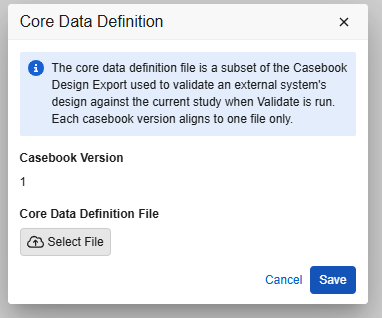
-
When the casebook version does have an associated CDD:
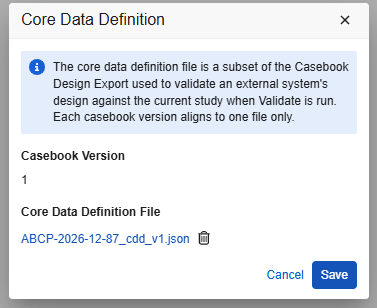
-
- If the existing casebook version does have a CDD file associated, click the Filename to download.
Upload Core Data Definition File (Studio)
To add a CDD file for a casebook version:
- Navigate to your Study in Studio. Adding or deleting a CDD is only allowed on the latest casebook version.
- From the Actions menu (), select Manage Core Data Definition (JSON).
- If there is already an existing file associated with the casebook version, it must be removed first. Refer to the next section Deleting Core Data Definition File and return to these steps.
- The dialog will show with no CDD file associated:
- Click Select File and browse to the file, and select it. The file chosen will then appear. If the file chosen was not the intended, click the X next to the file name, and select a different file. If the file is not of JSON format, the dialog will show an error and prevent a save.
- Click Save to associate that file to the casebook version.
Deleting Core Data Definition File (Studio)
- Navigate to your Study in Studio. Adding or deleting a CDD is only allowed on the latest casebook version.
- From the Actions menu (), select Manage Core Data Definition (JSON).
- The existing CDD will be shown as filename. Click the trash can option next to the file name:
- That action will indicate the file is to be deleted, but only on clicking Save will it be truly deleted. Click Save .
- At this point, re-access the Manage Core Data Definition option to upload an updated version
The Core Data Definition file is attached to each casebook version, as necessary. Veeva EDC does not store previous versions of this file, only the last uploaded is associated.
Running Core Data Definition Validations
The comparison of the CDD against the study design in the system is done as part of the Studio Validations job.
To run the Validations job from Studio:
- Navigate to your Study in Studio.
- From the Actions menu (), select Validate. If your study was already run through a validation job recently and has not changed, you will not see the option.
- With a CDD associated with the casebook version, options to run the job will appear. These options do not appear when there is no CDD associated.
- The default is to also compare the CDD to the study for Additionally Compare Core Data Definitions to Study Design. If you choose No, the second option will not apply
- Use the Prevent Validated Status when Core Data Definition Errors are Found option to indicate whether or not significant differences found comparing the CDD and study should block moving the casebook version to a status of validated.
The defaults for running comparison and blocking a move to validation status should typically be done. Consider when and who should be able to use these bypass options with your organization. The choices selected are stored and shown on the EDC Tools > Job History area
For actual comparisons and what constitutes warning vs. error type, see the Core Data Definition Validations section below.
The result of this job run is a ZIP file containing two CSVs, one for errors/warnings specific to the CDD comparison, and the other for the rest of Studio’s validation checking.
Related EDC API Endpoints
The EDC API to perform the actions described in the last section are as follows:
| EDC API / Action | Studio Equivalent Steps | Notes |
|---|---|---|
| Upload Core Data Definition File | Upload Core Data Definition Validations (Studio) | A parameter to this API can be used to replace (i.e. delete and upload the new file, as one API call) |
| Delete Core Data Definition File | Delete Core Data Definition File (Studio) | |
| Retrieve Core Data Definition File | Accessing Core Data Definition | This API will stream the JSON file attached through the API Currently, this endpoint is the only way to detect ‘Does a casebook version have an associated CDD?’ |
| Start Job (Studio Validations) | Running Core Data Definition Validations | The applicable type to start the job is design_validations__v Retrieving results from the job follows the same methods as any other job type. |
For full details on each endpoint including examples, see the EDC API Reference.
Core Data Definition Validations
Methodology
The keys to the comparison of a CDD attached to a casebook version and the actual study design in the Veeva EDC study are as follows:
- Major components (Event Groups, Forms, Codelist Choices, etc.) that exist in the CDD, but not in the study design of Studio → error
- Major components (Event Groups, Forms, Codelist Choices, etc.) that exist in the study design of Studio, but not in the CDD → warning
- Depending on the property
- The match at any of the design levels is by design Name. (e.g. “AE” for the Adverse Event form). Generally speaking, Form design names become the names of export tables/files, whereas the name of an Items becomes the name of the column in the export tables/files.
- Just as is true with all other Studio Validations checks:
- Warnings do not block the move to Validated casebook version status
- Errors do block the move to Validated casebook version status
- The general structure of a CDD is a subset of the full study design (CDE). One can upload full CDEs for purposes of the comparison, but only the fields listed below are compared
CDD Structure Summary
The CDD structure involves high level study properties and 4 main sections:
eventgroup_defis the ordered schedule of the study. That is, the Event Groups, Events contained in each, and Forms contained in those Events.form_defincludes an entry for each Form used somewhere within the study’s schedule (theeventgroup_defsection). The Item Groups on the Form, Items in those Item Groups, and where an Item uses a Codelist or Unit Definition, which is assigned.unit_defincludes an entry for each Unit Definition used by at least one Item somewhere in the study design. In the entry, the choices of units are further defined.codelist_defincludes an entry for each Codelist used by at least one Item somewhere in the study design. In the entry, the choices of the codelist are further defined.
Field by Field
The comparisons done across the CDD happen during the Studio Validations job. These comparisons are classified as Errors or Warnings (see table below). Vault also indicates the type within the Issue ID Raised value (“E” for Error and “W” for Warning).
| JSON Location | Notes |
|---|---|
study_name_production |
The current (or anticipated) labeling of the study in production |
version |
Meant to match the casebook version being compared in the study design If these are different, a warning is raised, but comparisons continue |
| (Ordered schedule of study: Event groups contained) | |
eventgroup_def/name |
This is what matches, i.e. ‘both sides have’ |
eventgroup_def/label |
Warning when different |
eventgroup_def/repeat_maximum |
Error when different If an event group doesn’t repeat, this will be a ‘1’ |
eventgroup_def/external_id |
Warning when different |
eventgroup_def/event_def |
For this Event Group, the Events it contains |
| (Ordered schedule of study: Events of each event group) | |
eventgroup_def/event_def/name |
This is what matches, i.e. ‘both sides have’ |
eventgroup_def/event_def/label |
Warning when different |
eventgroup_def/event_def/external_id |
Warning when different |
eventgroup_def/event_def/ |
For this Event, the Forms it contains |
| (Ordered schedule of study: Forms within each Event) | |
eventgroup_def/event_def/form_def/name |
This is what matches, i.e. ‘both sides have’ |
eventgroup_def/event_def/form_def/label |
Warning when different |
eventgroup_def/event_def/form_def/repeat_maximum |
Error when different If a form doesn’t repeat, this will be a ‘1’ |
eventgroup_def/event_def/form_def/external_id |
Warning when different |
| (Form Definitions: Main properties) | |
form_def/name |
This is what matches, i.e. ‘both sides have’ |
form_def/label |
Warning when different |
form_def/repeat_maximum |
Error when different If a form doesn’t repeat, this will be a ‘1’ |
form_def/external_id |
Warning when different |
form_def/itemgroup_def/ |
For this Form, the Item Groups it contains |
| (Form Definitions: Item groups within the form, ordered) | |
form_def/itemgroup_def/name |
This is what matches, i.e. ‘both sides have’ |
form_def/itemgroup_def/label |
Warning when different |
form_def/itemgroup_def/repeat_maximum |
Error when different If a form doesn’t repeat, this will be a ‘1’ |
form_def/itemgroup_def/external_id |
Warning when different |
form_def/itemgroup_def/item_def/ |
For this Item Group, the Items it contains |
| (Form Definitions: Items in the item groups of the form, ordered) | |
form_def/itemgroup_def/item_def/name |
This is what matches, i.e. ‘both sides have’ |
form_def/itemgroup_def/item_def/external_id |
Warning when different |
form_def/itemgroup_def/item_def/label |
Warning when different |
form_def/itemgroup_def/item_def/data_type |
Error when different Examples: text__v, integer__v, float__v, etc. |
form_def/itemgroup_def/item_def/precision |
Error when different For Items defined as Float, the number of allowed ‘after the decimal’ |
form_def/itemgroup_def/item_def/length |
Error when different |
form_def/itemgroup_def/item_def/codelist_def |
Error when different Should the Item be of Codelist type, the Codelist Definition it uses (choices defined in later section) |
form_def/itemgroup_def/item_def/unit_def |
Error when different Should the Item be of Unit type, the Unit Definition it uses (unit choices defined in later section) |
form_def/itemgroup_def/item_def/allow_unknown_day |
Error when different |
form_def/itemgroup_def/item_def/allow_unknown_month |
Error when different |
form_def/itemgroup_def/item_def/allow_unknown_time |
Error when different |
| (Unit definitions) | |
unit_def/name |
This is what matches, i.e. ‘both sides have’ |
unit_def/external_id |
Warning when different |
unit_def/choice/ |
For this Unit Definition, the choices for units allowed |
unit_def/choice/name |
This is what matches (for a choice), i.e. ‘both sides have’ |
unit_def/choice/label |
Warning when different |
unit_def/choice/external_id |
Warning when different |
| (Codelist definitions) | |
codelist_def/name |
This is what matches, i.e. ‘both sides have’ |
codelist_def/external_id |
Warning when different |
codelist_def/choice/ |
For this Unit Definition, the choices for units allowed |
codelist_def/choice/code |
This is what matches (for a choice), i.e. ‘both sides have’ |
codelist_def/choice/label |
Warning when different |
codelist_def/choice/external_id |
Warning when different |
Issue IDs
The following are the issue IDs possible and when they occur. The Summary and Description columns of the output further describe the issue, and indicate which design entity / properties are involved
| Issue ID Raised | When / Notes |
|---|---|
| DDE-001 | The structure of the file is invalid, doesn’t comply with the areas described in the last section |
| DDW-002 | The CDD has no study schedule, only Form, Codelist, and Unit definitions to compare |
| DDE-003 | The anticipated name of the study in production |
| DDW-004 | The file associated with the study design appears to have a different casebook version (embedded) than what is being compared (study design). All other comparisons continue, this is only noted as a warning. |
| DDE-099 | General error with the attempt to run these validations. Support contact is likely for more investigation |
| DDE-101 | An entity (Event Group, Event, Form, etc) exists in the CDD but not in the study design |
| DDW-102 | An entity (Event Group, Event, Form, etc) exists in the study design but not in the CDD |
| DDE-103 | An entity (Event Group, Event, Form, etc) exists in both, but a crucial property is different. |
| DDW-104 | An entity (Event Group, Event, Form, etc) exists in both, but a less crucial property is different. |